Linux Basics
Kernel
concurrent vs parallel
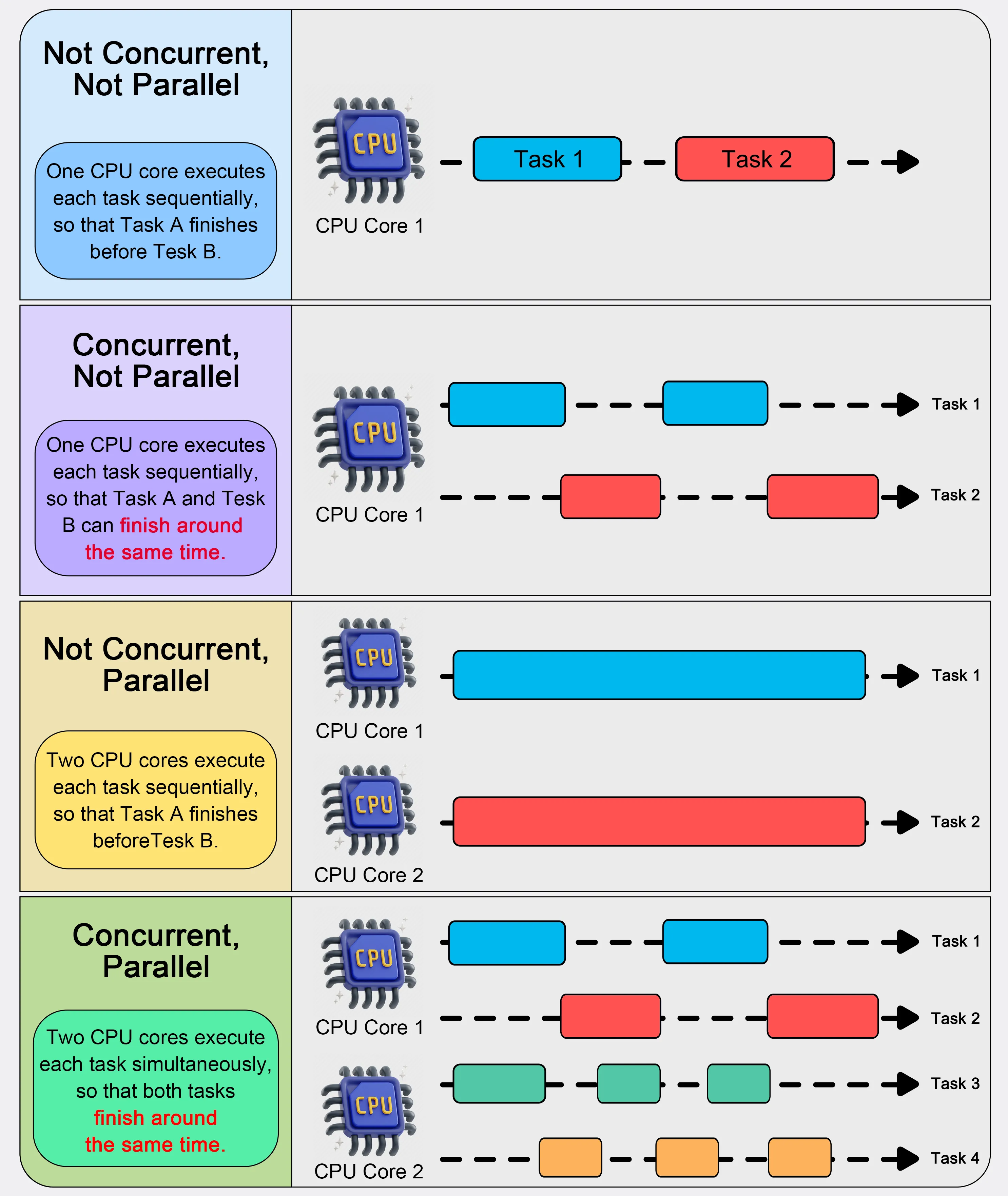
Basics
Sudo
| Command | What it does | Who’s password? | Shell & session | Env / HOME / PATH | Working dir | Profiles read | Typical use |
|---|---|---|---|---|---|---|---|
su | Switch user (root by default) without a login session | Target user’s password (e.g., root’s) | Runs target user’s login shell, not as a login shell | Mostly inherits current env; sets USER/LOGNAME/HOME/SHELL to target; PATH usually inherited | Stays where you are | None (non-login) | Quickly become another user when you know their password |
sudo <cmd> | Run one command as root (or another user with -u) | Your (if allowed by sudoers) | Executes the command | Env is sanitized by sudo; HOME stays yours (unless -H); PATH is a secure path from sudoers | Stays where you are | None | Safest, audited elevation for a single command |
sudo -i | Start a login shell as target (root by default) | Your | Runs target user’s login shell as a login session | Env largely reset to target’s; HOME=/root; PATH set to login/secure defaults | cd to target’s home (e.g., /root) | Login files (e.g., /etc/profile, root’s ~/.profile/~/.bash_profile) | Full “pretend I logged in as root” session |
sudo -s | Start a shell as root without a login session | Your | Runs your shell ($SHELL) but as UID 0 | Env mostly preserved (still sanitized by sudoers); HOME stays yours (unless -H) | Stays where you are | None (non-login) | Quick root shell that keeps your environment |
Ubuntu/Debian often have the root account locked by default → su won’t work unless root has a password; use sudo.
EOF
Called a here document EOF is for End Of File and it’s used like this
cat << EOF > file.txt
This is a test
more content
EOF
but EOF can be any string that won’t otherwiise appear in the input.
Bloging
#ls -l
test1 test2 test3 test4
#cat test?
test1
test2
test3
test4
fork()
fork system is fondamental in the Unix/linux ecosystem since it’s allow to create new processes:
- Isolation and Safety: child get a copy of the parent’s memory space so it don’t affect the parent memory.
- concurrently
#include <stdio.h>
#include <unistd.h>

int main() {
    pid_t pid = fork();

    if (pid == 0) {
        // Child process
        printf("I am the child (PID=%d)\n", getpid());
    } else {
        // Parent process
        printf("I am the parent (PID=%d), child PID=%d\n", getpid(), pid);
    }

    printf("This line is executed by BOTH parent and child\n");

    return 0;
}
I am the parent (PID=1234), child PID=1235
I am the child (PID=1235)
This line is executed by BOTH parent and child
This line is executed by BOTH parent and childBoth processes run “in parallel” after fork(). After fork(), both the parent and the child exist, and the operating system’s scheduler decides which one runs first. Return values: In the parent, fork() returns the child’s PID (positive number). In the child, fork() returns 0. The order is not predictable — parent may run first, child may run first, or they may even interleave line by line if both are writing to the terminal at the same time. If you need a specific order, you use wait() in the parent to wait for the child to finish.
exec
exec is a command (in Unix shells) or a function (in many programming languages) that replaces the current process with another one.
exec lsDaemon
In computing, a daemon is a program that runs as a background process, rather than being under the direct control of an interactive user. Customary convention is to name a daemon process with the letter d as a suffix to indicate that it’s a daemon. For example, syslogd is a daemon that implements system logging facility, and sshd is a daemon that serves incoming SSH connections.
Even though the concept can apply to many computing systems, the term daemon is used almost exclusively in the context of Unix-based systems. In other contexts, different terms are used for the same concept.
Systems often start daemons at boot time that will respond to network requests, hardware activity, or other programs by performing some task. Daemons such as cron may also perform defined tasks at scheduled times.
Init
In Unix-like computer operating systems, init (short for initialization) is the first process started during booting of the operating system. Init is a daemon process that continues running until the system is shut down. It is the direct or indirect ancestor of all other processes and automatically adopts all orphaned processes. Init is started by the kernel during the booting process; a kernel panic will occur if the kernel is unable to start it, or it should die for any reason. Init is typically assigned process identifier 1.
In a Unix-like system, the parent process of a daemon is often, but not always, the init process. A daemon is usually created either by the init process directly launching the daemon, by the daemon being run by an initialization script run by init, by the daemon being launched by a super-server launched by init.
Writing bash
you should put set -euxo pipefail at the begin of your bash script:
-ewill exit right away when a command failed (if you have a needed fail command do :|| true)-owill improve the-ewith the edge case of piping ignored error (e.g:error | echo "a')-uwill treat unset variables as error (-uis smart enough to deal with var b if a undefined e.g ANS=${a:-b})-xuse for debugging it will print all command before executing it.-Eis like-ebut catch error for trap likeSIGINT,ERR,RETURN,DEBUG
Check variables is set
if [ -z "${VAR:-} ]; then
    echo "VAR was not set"
fi
User
Here’s a concise side-by-side:
| Command | What it does | Who’s password? | Shell & session | Env / HOME / PATH | Working dir | Profiles read | Typical use |
|---|---|---|---|---|---|---|---|
su | Switch user (root by default) without a login session | Target user’s password (e.g., root’s) | Runs target user’s login shell, not as a login shell | Mostly inherits current env; sets USER/LOGNAME/HOME/SHELL to target; PATH usually inherited | Stays where you are | None (non-login) | Quickly become another user when you know their password |
sudo <cmd> | Run one command as root (or another user with -u) | Your password (if allowed by sudoers) | Executes the command, no new shell | Env is sanitized by sudo; HOME stays yours (unless -H); PATH is a secure path from sudoers | Stays where you are | None | Safest, audited elevation for a single command |
sudo -i | Start a login shell as target (root by default) | Your password | Runs target user’s login shell as a login session | Env largely reset to target’s; HOME=/root; PATH set to login/secure defaults | cd to target’s home (e.g., /root) | Login files (e.g., /etc/profile, root’s ~/.profile/~/.bash_profile) | Full “pretend I logged in as root” session |
sudo -s | Start a shell as root without a login session | Your password | Runs your shell ($SHELL) but as UID 0 | Env mostly preserved (still sanitized by sudoers); HOME stays yours (unless -H) | Stays where you are | None (non-login) | Quick root shell that keeps your environment |
Notes & quick guidance
- Ubuntu/Debian often have the root account locked by default →
suwon’t work unless root has a password; usesudo. - Prefer
sudo <cmd>for least-privilege and better audit logs. - Use
sudo -iwhen you really want a clean, root login environment (like after SSH’ing to administer a box). - Use
sudo -swhen you want a quick root shell but keep your current env and directory. - Rough equivalence:
sudo -i≈su -(butsudostill enforces sudoers policy & logs);sudo -s≈su(non-login), but with your password & sudo policy.
Kernel
Kexec
Normalement, quand tu redémarres après une mise à jour noyau → la machine passe par BIOS/UEFI → bootloader (GRUB) → init → noyau. kexec permet de charger directement un nouveau noyau en mémoire sans passer par le BIOS/UEFI ni GRUB. Avantages : Reboot plus rapide (utile sur serveurs critiques). Réduit le downtime quand tu patches le noyau. Inconvénient : tout n’est pas réinitialisé (ex: le firmware, les périphériques bas-niveau). Alternative plus avancée : kpatch, livepatch, qui permettent de patcher le noyau sans redémarrage du tout.
Par défaut, quand vous redémarrerez la machine avec la commande reboot, kexec-tools n’entrera pas en action.
Il faut exécuter la commande suivante pour charger le kernel en cours à nouveau :
kexec -l /boot/vmlinuz-$(uname -r) --initrd=/boot/initramfs-$(uname -r).img --reuse-cmdlineou sinon
kexec -l /boot/vmlinuz-3.10.0-327.28.3.el7.x86_64 --initrd=/boot/initramfs-3.10.0-327.28.3.el7.x86_64.img --reuse-cmdlineif you want to unload the kernel from memory
kexec -uEnsuite, pour redémarrer avec kexec, il faut utiliser la commande suivante :
kexec -eCase Studies
Kiosk
A kiosk system is a specialized computer setup designed to provide users with a services in a public environment. Kiosks are often used in shops, museums, libraries for ticket purchasing, check-in, and product browsing.
how to create a simple kiosk devices ?
- create a dedicated user (e.g: kiosk)
- put your app or logique in the (e.g: /opt/kiosk)
- put a systemd service to launch the headless or kiosk browser
- harden: disable unused services, SSH keys only, firewall, minimal packages.
the interestin part is the 3. i will explain it here.
Here’s a clear, security-first way to turn your Raspberry Pi into a single-purpose “camera” kiosk that auto-starts a script (e.g., a web app in full-screen) and blocks normal user access.
TL;DR
- Use a dedicated user (no sudo) just for this role.
- Put your app/startup logic in /opt/camera-app.
- Use a systemd service to start it at boot (headless) or a kiosk browser service if you need a fullscreen web UI.
- Harden: disable unused services, SSH keys only, firewall, minimal packages. ?
- Prepare the system (principles)
- OS: Raspberry Pi OS Lite for headless apps; Raspberry Pi OS with Desktop if you need a browser kiosk.
- User: create a dedicated user, e.g.
camera, with no sudo; add only minimal groups (e.g.videofor camera access). - Filesystem layout: keep your app at
/opt/camera-app; put your launcher at/usr/local/bin/…. - Networking: only open the ports you need; prefer SSH with keys; disable password logins.
- Start any script at boot (headless / no GUI)
Script (example): /usr/local/bin/camera-start
#!/usr/bin/env bash
set -euo pipefail
# Example: start your camera service / web server
exec /usr/bin/python3 /opt/camera-app/app.py
sudo chmod +x /usr/local/bin/camera-startsystemd unit: /etc/systemd/system/camera.service
[Unit]
Description=Camera single-purpose service
After=network-online.target
Wants=network-online.target

[Service]
User=camera
Group=camera
WorkingDirectory=/opt/camera-app
ExecStart=/usr/local/bin/camera-start
Restart=always
RestartSec=2
# Hardening (tune paths as needed)
NoNewPrivileges=yes
PrivateTmp=yes
ProtectSystem=full
ProtectHome=yes
ReadWritePaths=/opt/camera-app /var/log/camera
CapabilityBoundingSet=
AmbientCapabilities=
LockPersonality=yes
ProtectControlGroups=yes
ProtectKernelModules=yes
ProtectKernelTunables=yes
SystemCallFilter=@system-service

[Install]
WantedBy=multi-user.target
Enable:
sudo systemctl daemon-reload
sudo systemctl enable --now camera.service
This gives you a robust, auto-restarting one-role service with sandboxing.
- Kiosk browser (fullscreen web page) on boot
Use this when you want to display a web UI (local or remote) and “lock” the device. Option A — Simple (Desktop autologin + autostart)
-
Install desktop & tools (if not already):
sudo apt update sudo apt install --no-install-recommends xserver-xorg lightdm chromium-browser unclutter -
Set Desktop autologin for user
camera(e.g.,sudo raspi-config→ System Options → Boot/Auto login → Desktop Autologin). -
Autostart file for PIXEL/LXDE:
mkdir -p /home/camera/.config/lxsession/LXDE-pi
nano /home/camera/.config/lxsession/LXDE-pi/autostart
Add:
@xset s off
@xset -dpms
@xset s noblank
@unclutter -idle 0
@chromium-browser --kiosk --incognito --noerrdialogs --disable-translate --overscroll-history-navigation=0 http://localhost:8080
Then:
chown -R camera:camera /home/camera/.config
Option B — Systemd user service (cleaner)
-
Keep Desktop autologin for
camera. -
User unit:
/home/camera/.config/systemd/user/kiosk-browser.service[Unit] Description=Chromium Kiosk After=graphical-session.target [Service] ExecStart=/usr/bin/chromium-browser --kiosk --incognito --noerrdialogs --disable-translate --overscroll-history-navigation=0 http://localhost:8080 Restart=always RestartSec=2 [Install] WantedBy=default.target -
Enable (as
camera):systemctl --user daemon-reload systemctl --user enable --now kiosk-browser.service
Notes (kiosk):
unclutterhides the cursor.xsetlines prevent blanking/sleep.- For local camera feed, point Chromium to your local service (e.g.,
http://localhost:8080). - You can also run a watchdog (systemd Restart) so the UI restarts if it crashes.
- Lockdown checklist
-
Users & sudo: the
camerauser should not be insudo. Keep a separate admin user with SSH keys. -
SSH:
PasswordAuthentication no,PermitRootLogin no. -
Firewall: allow only required inbound ports (e.g.,
ufw allow 22/tcp,ufw allow 8080/tcp, thenufw enable). -
Services: disable what you don’t use (
systemctl disable --now ...). -
TTYs: if truly kiosk-only, you can mask local TTY logins:
sudo systemctl mask getty@tty1.service(Keep remote access via SSH, or you can lock yourself out.)
-
Packages: remove anything you don’t need. The fewer packages, the smaller the attack surface.
-
Filesystem (optional): consider read-only root or overlayfs if the device must be tamper-resistant.
-
Auto-updates: either schedule maintenance updates or pin known-good versions for stability.
- Recovery tips
- Always keep one admin path (SSH key user) so you can revert kiosk settings.
- Test changes with a keyboard/monitor before deploying headless.
If you tell me which camera stack you’re using (libcamera, Motion, RTSP→HLS, etc.) and whether the web UI is local or remote, I can tailor the script/service and permissions exactly.
Linux
systemctl
start - stop usual enable - disable allow link into the system folder to start at boot time is- enable/active/disable
systemctl cat service.service units display or show for env var systemctl list-dependencies services
you can (un)maske a service so the service is likned to /dev/null
you can edit the service and this will create an override file in service.d/override.conf or if you have a lot to change or don’t want to override do edit —full
if you want to remove a modif remove the override or /service.service sudo rm /etc/systemd/system/nginx.service sudo rm -r /etc/systemd/system/nginx.service.d
and reload the damemon sudo systemctl daemon-reload
target groups related service, can also define system boot stages [Unit] After=network.target
depend on generique state WantedBy=multi-user.target
you can also isolted target For instance, if you are operating in a graphical environment with graphical.target active, you can shut down the graphical system and put the system into a multi-user command line state by isolating the multi-user.target. Since graphical.target depends on multi-user.target but not the other way around, all of the graphical units will be stopped.
you can reload the configuration without the restart to avoid down time !
common errors failed to start unit or unit not found service are located to: /etc/systemd/system service /lib/systemd/system config file
Journalctl is the syslog of systemctl
before using journal u need to config the timezone so you won’t get problem with time timedatectl status use —utc
sudo timedatectl set-timezone
-b been colected since the most recent reboot journalct can save log of previous reboot you need to create a folder /var/log/journal and config /etc/systemd/journald.conf [Journal] Storage=persistent
filter time
to list boots journalctl --list-boots
Output
-2 caf0524a1d394ce0bdbcff75b94444fe Tue 2015-02-03 21:48:52 UTC—Tue 2015-02-03 22:17:00 UTC
-1 13883d180dc0420db0abcb5fa26d6198 Tue 2015-02-03 22:17:03 UTC—Tue 2015-02-03 22:19:08 UTC
0 bed718b17a73415fade0e4e7f4bea609 Tue 2015-02-03 22:19:12 UTC—Tue 2015-02-03 23:01:01 UTC
use the previous -b -1 or
for a more precis time window use
—since and —until with this format “YYYY-MM-DD HH:MM:SS” you can also use relative times like “yesterday today tomorrow now” “1 hour ago”
filter service using the -u for unit -u can be combine for multiple service -u nginx -u php usefull for service interating
there is also _PID= _UID _GID
also executable path journalctl /usr/bin/bash
nixos krohnkite
use meta \ to cycle between style
see kernel messages -k
filter severity level with -p 0: emerg 1: alert 2: crit 3: err 4: warning 5: notice 6: info 7: debug
if you want to use the data ouput for process use —no-pager or json format with -o json
watch real time -f number of line -n
clean the logs with vacuum size or time
journalctl have the option to only store into the ram the logs config in journald.conf [Journal] Storage=volatile
for a debug and verbose mode to output extended error message use -xe
rsyslog software to config and centralist the logs into a server file config is divid into 3 part: modules global directives rules
zsh fzf
add the plugins and enjoy the: ctr + r command ctr + t file alt + c folder
tail -f how it works ? tail loop and monitor the file size with stat()
LVM
PV Physique Volume sdb1 VG Group Volume VG01 LV Logical Volume LV01 Système de ficher EXT4 montage /, /var/ volume
first need to create physical volume disk
sudo pvcreate /dev/sda /dev/sdb
verify
sudo pvdisplay
create vg
sudo vgcreate LogsData /dev/sda /dev/sdb
create lv
sudo lvcreate -L 10G -n LogsData LogsData name of lv | name of vg
need to formate the disk
sudo mkfs.ext4 /dev/LogsData/LogsData
need to mount logical volume
sudo mkdir -p /logs sudo mount /dev/LogsData/LogsData /logs
to make the moutage persite use the /etc/fstab
how to extand the vg ? sudo vgextend LogsData /dev/sdf
next incrice the lv sudo lvextend -L §20G /dev/LogsData/LogsData and need to inscrete the filesystem also sudo resize2fs /dev/LogsData/LogsData
if you need to reduce the size sudo resize2fs /dev/PostgresData/PostgresData 100G sudo lvreduce -L 100G /dev/PostgresData/PostgresData
snapshots creation
sudo lvcreate —size 10G —snapshot Firstsnap /dev/LogsData/LogsData supp snap sudo lvremove /dev/LogsData/Firstsnap
if you want to remove the vg first you need to remove the lv same for the pv
fdisk
reatin the partion
fdisk /dev/
mkfs for creation of the filesystem exfat windows macos and linux with very lare size
JAVA Jgroups java toolkit for cluster communication lets node discovers each other Infinispan distributed memory key value on top of jgroups JDBC and ODBC can aptrate the database used in production with driver
Start up process
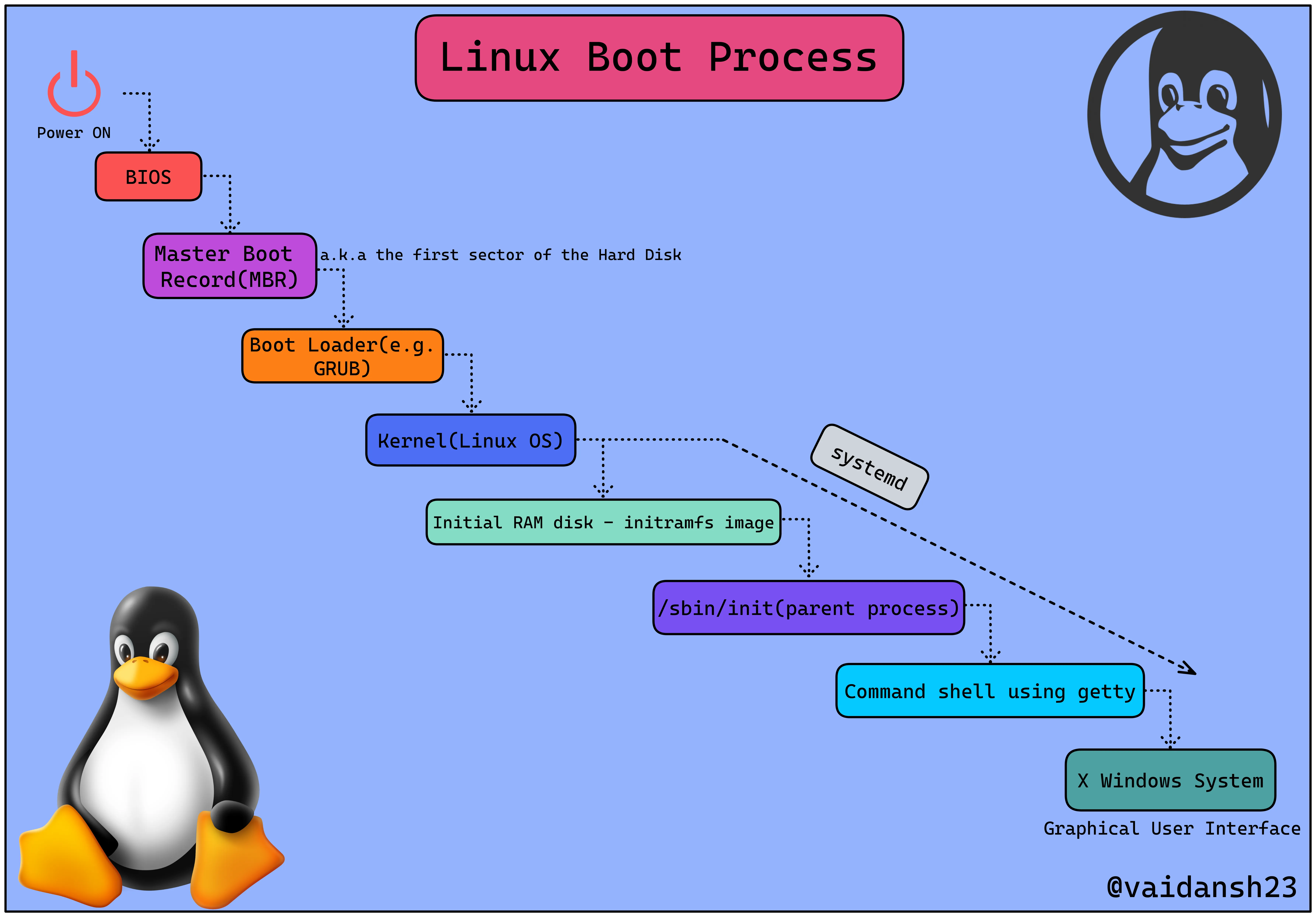
I. BIOS + UEFI
bios.png
BIOS stands for Basic Input/Output System. It is located in a ROM chip on the PC motherboard.
This part of the Linux Boot process has more to do with the hardware than Linux itself.
As you turn on your computer, the BIOS instantly runs POST (Power On Self Test).
POST is a part of the BIOS which performs plenty of diagnostic tests on the hardware components such as SSD/HDD, RAM, Keyboard, Mouse, USB, etc.
Once POST has checked the basic operability of the hardware, the BIOS will now start looking for the Boot Loader, which is usually stored in one of the hard disks.
UEFI UEFI can be considered as a successor of BIOS.
An abbreviation for Unified Extensible Firmware Interface, it performs the same function as a BIOS with one major difference: it keeps all data regarding initialization and startup in an.efi file instead of storing it on the firmware.
(Firmware is the programming that’s embedded in the nonvolatile memory of a device.)
The.efi file, which is stored on a specific disc called EFI System Partition(ESP) which contains all information regarding initialization and starting in UEFI (ESP).
Most modern devies are equipped with UEFI, as it provides features like Secure Boot, Quick Boot, etc.
There are numerous reasons why UEFI is preferred over BIOS, which is a vast topic in itself, so fun researching!
II. Master Boot Loader (MBR).
MBR.png
MBR is the initial (main) sector of a hard disc that identifies the location of the operating system (OS) to complete the booting process.
MBR, depending on your hardware, is located in /dev/hda, or /dev/sda.
It is a 512-byte image containing code as well as a brief partition table that facilitates in the loading/execution of GRUB (Boot Loader).
III. Boot Loader
Bootloader.png
There are several bootloaders for Linux, the most common of which being GRUB and LILO, with GRUB2 being one of the most recent.
GRand Unified Boot loader (GRUB) is usually the first thing you’ll see when you boot up your computer.
It consists of a simple menu displaying the options to choose the Kernel in which you want to boot (if you are having multiple kernel images installed) using your keyboard.
When dual booting your system, GRUB2 lets you select which operating system to boot into.
LubuntuBios.png
IV. Kernel
Kernel.png
The Kernel has complete control over everything in your system, leading it to be known as the core of the OS.
Kernels are self-extracting and stored in compressed format to conserve space.
Once the chosen kernel is loaded into the memory and begins execution, it starts extracting itself before performing any useful task.
Once loaded by the bootloader, it mounts the root file system and initializes the /sbin/init program, which is commonly referred to as init.
LinuxKernel.png
V. Initial RAM disk-initramfs image
initramfs.png
The initial RAM disk is an initial/temporary root file system that is mounted prior to when the real root file system is available.
This initramfs image is embedded in the Kernel and contains minimal binary files, modules & programs required for mounting the real root filesystem.
VI. /sbin/init(a.k.a init) [Parent Process]
sbininit.png
init is amongst the first command to be executed by the Kernel, once it’s loaded.
This program manages the rest of the booting process and sets up the environment for the user.
Essentially, this phase does everything that your system requires during system initialization: checking file systems, configuring the clock, initializing serial ports, and so on.
Along with booting up the system, the init command also assists in keeping the system running and shutting it down correctly.
VII. Command Shell using Getty
comandshell getty.png
Getty is short form for “get tty”(tty - teletype), It’s a UNIX program running on the host machine that manages the physical or virtual terminals
Getty opens TTY lines, sets their modes, prints the login prompt, obtains the user’s name, and then starts the login process for the user.
Subsequently, users can utilize the system after authenticating themselves.
VIII. X Windows
wxbluegreen.png
X Windows System is an open source, client server system which implements a windowed Graphical User Interface(GUI).
Also known as X; it provides the basic structure for a GUI environment, including the ability to draw and move windows on the display device, as well as communicate with a mouse and keyboard.
IX. systemd
systemd.png
This aforementioned sequential startup method is quite conventional and belongs to the System V variant of UNIX, following which the controversial replacement of systemv with systemd took place.
On one hand, where SysVinit(Traditional init system - System V) followed the sequential process, on the other hand, systemd takes advantage of the parallel processing power of the modern multi processors/core computers.
NOTE: systemd is initialized by the Kernel once its loaded-up, after which systemd starts the required dependencies and takes care of the rest.
systemd simplifies the startup process and reduces boot time by launching multiple processes simultaneously/ parallelly.
Command
Networking
Check the open ports
ss -tulnfirewall
this will tmp open all untill system reboot and restart services
sudo iptables -P INPUT ACCEPT # allow all incomming traffic
sudo iptables -F # Deletes all rules
if you want persistent command there is 2 methode:
sudo iptables-save: that will write you current conf in the /etc/iptables/rules.v<4/6> will auto load the conf at boot.sudo iptables-save > /etc/iptables/rules.v4: but you need to veri conf, create a services that will load the config a boot.
General command
| Command | Specialty | When to Use |
|---|---|---|
find | Search for files by attributes | Find files by name, size, date, or permissions |
locate | Ultra-fast name-based search | When speed is critical (uses an indexed database) |
grep | Search within file contents | Find a string or pattern inside files, use the -C n to see n line above and below |
which / whereis | Locate executables | Find where a program is installed |
xargs | Execute commands in bulk | Pass results from find to another command |
awk | Process tabular data | Extract or transform columns |
sed | Stream edit files | Replace text or delete lines |
cut | Extract columns | Split by delimiter or fixed position |
SHA
check 2 file are the same do:
sha256sum file1 file2This will only compare the content of the files, not the title or metadata
Find
find parcourt le systeme a la recherche de votre ficher.
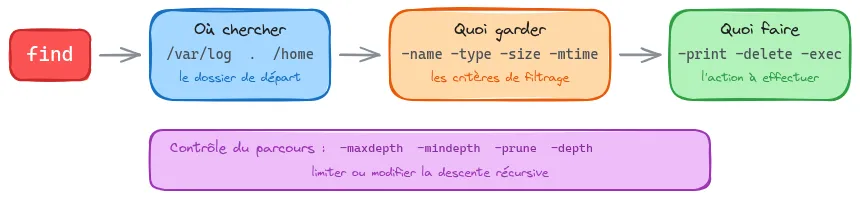
the print0 replace return line with null charatere and make ’”/ normal it’s usually used with xargs -0
examples
find /var/log -name '*.log' -exec grep -l "error" {} +
find . -name '*.tmp' -print0 | xargs -0 rm -f
locate '*.conf' | grep nginx
time options -mtime -7 Modifié il y a moins de 7 jours -mtime +30 Modifié il y a plus de 30 jours
command ; : lance une commande par fichier (lent si beaucoup de fichiers)
- : regroupe les fichiers et lance une seule commande (rapide, recommandé)
find . -type f -exec chmod 644 {} \;
find . -type f -exec chmod 644 {} +
BASH
for
for image in hardened/traefik:3.6.7-debian13 hardened/keycloak:26.5.4-debian13 tecnativa/docker-socket-proxy:v0.4.2 hardened/keycloak:26.5.1-debian13 hardened/postgres:18.1-debian13 core/lissy93/dashy:3.1.2; do
    skopeo copy docker://registry.jernas.dev/$image docker://10.255.20.101:5000/$image --src-tls-verify=false --dest-tls-verify=false
done
xargs
echo -n 'traefik:3.6.7-debian13 keycloak:26.5.1-debian13-dev keycloak:26.5.1-debian13' | xargs -I {} -P 10 -d ' ' skopeo copy docker://registry.jernas.dev/hardened/{} docker://10.255.20.101:5000/hardened/{} --src-tls-verify=false --dest-tls-verify=falseRsync
use this flags:
rsync -avhP <file> <file>Files
Here are all the usefull command on storage and
du -hs <file_or_folder>
# for sorting
du -hs | sort -h # h for sorting humain format
df -h | sort -hrk 5 # r to get the laster k which column to sort
to see where a process use a file ?
lsof | grep <block_file> # check the id of the process that use the file
kill -9 <process_id> # kill the process
Debian Installer
is a temp linux use to install the true linux. If you ever installed a linux you have comme across the GUI installer as bellow:
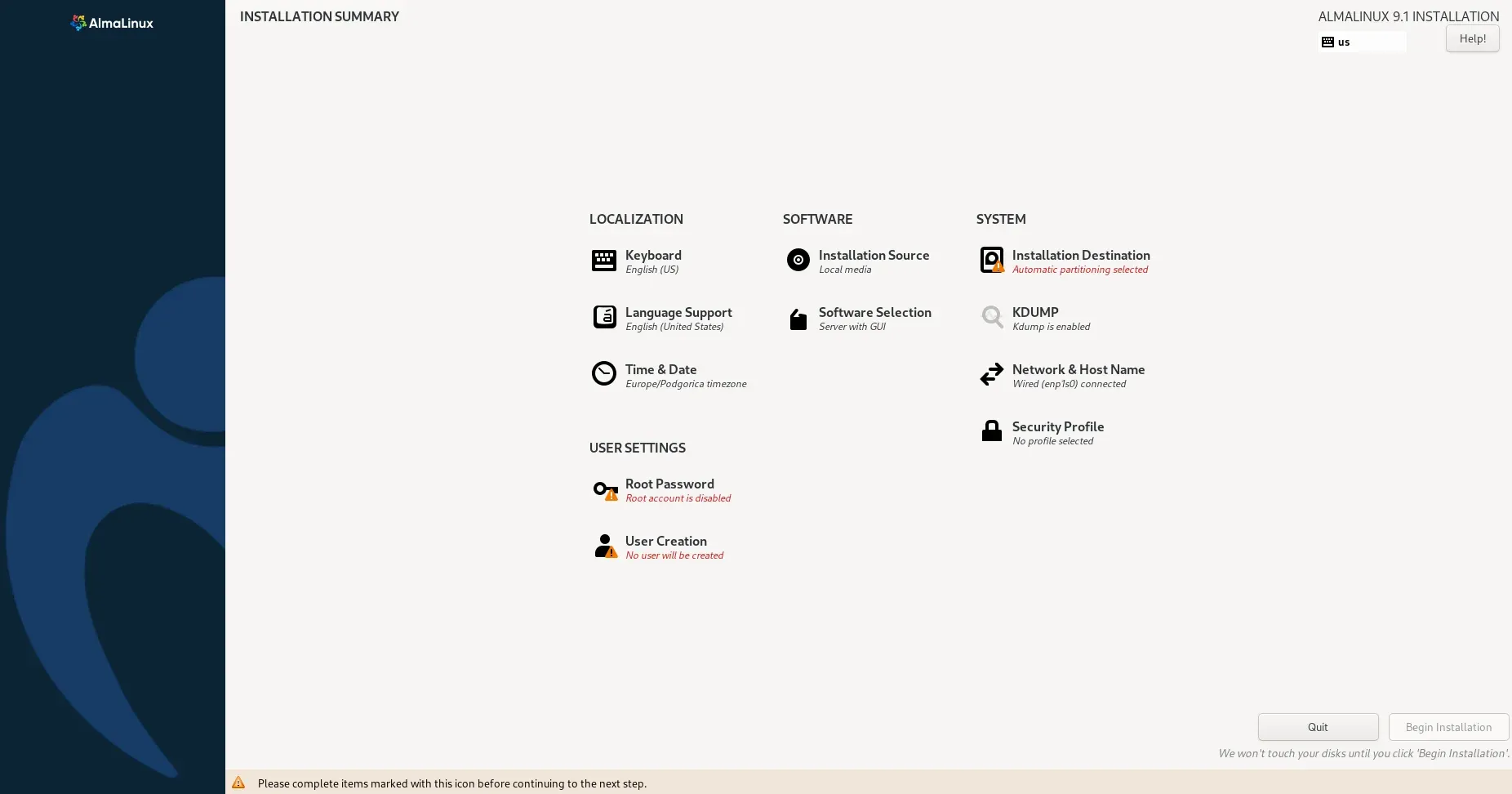
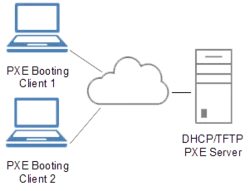
But in entreprise we generaly use a preseed (debian) or kickstar (RHEL), this is a powerfull tool that allow the auto installation combien with a PXE:
Nowdays there are complete solutions go see:
- dnsmasq: # TODO
- Rebar: # TODO
- Foreman: # TODO
- Cobbler: # TODO
- Rack Digital Rebar: # TODO
- Netbootd: new Github Netbootd project a small lightweight project