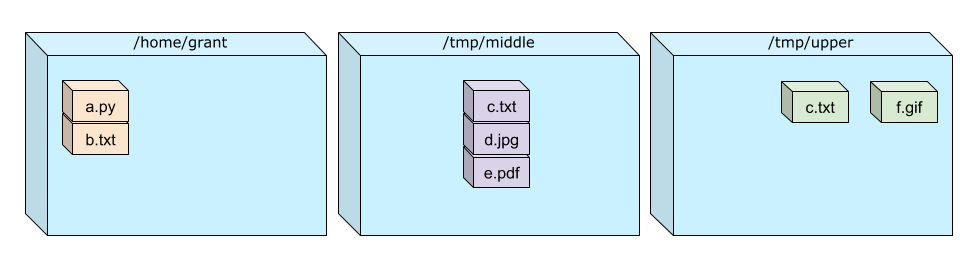
 then the magic of overlay
Docker images are
container images are binary packages that include everything needed to run an application, including the code, runtime, libraries, and dependencies. They are built from a Dockerfile, which contains a set of instructions on how to assemble the image.
I will explain all the key concepts of docker before going and creating a docker image ! WHY ? because else you will not understand how docker works, is that a problem ? no, i didn’t need to understand to work with it for years. But i do regret not taking the time to understand it earlier (like with many things in life) sigh Overlay the encapsulation is base on the overlay filesystem,
then the magic of overlay
mount \
    -t overlay \
    -o \
    lowerdir=/home/grant:/tmp/middle, \
    upperdir=/tmp/upper,\
    workdir=/tmp/workdir \
    none \
    /tmp/overlay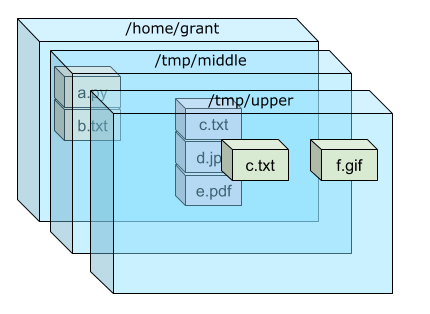
to not modify the original files, create a upper layer that will container the new flie in the overlay filesystem.
Usualy :
/bin /sbin are runtime binaries /lib /lib64 are runtime libraries /usr os tooling lang ?
basique image are parent referencing. but complex images can acyclic graphs of layers.
when you remove something a new layer is created that removes the file from the parent layer but the file is still in the overlay filesystem, so the image is not smaller.
flowchart LR
    A[A: base ubuntu image] --> B[B: add big file]
    B --> C[C: remove big file]
    C --> D[D: your application]
also if you change a step all the prior layers are rebuilt. SO always go from the least to the most changing step in your Dockerfile. copy dependance file then download dependencies and run the application or other.
but anyone with little knowledge of docker can see all layers and call secret (construct the container to layers n and get infos) so don’t put secret in the image, use environment variables or docker secrets.
Cgroups Syscall
container had 2 main categories of use cases:
system containers are used to run entire operating systems ssh cron … but now the defaut is an application container (there run in a single process)
bulding a container image you need to know 2 files:
Bulding bock
Example
FROM ubuntu:latest

RUN echo "Hello World"
docker build -t echo:latest .
docker run echo:latestcmd run comamnd, when runing the container docker will run the command via /bin/sh -c so if run docker run ubuntu:latest time you will get but people ask (get the reference blog) to customize the command so came entrypoint.
FROM ubuntu:latest
RUN sdkfjk
CMD ["cat"]
ENTRYPOINT ["/etc/os-release"]
docker run imageCAT
docker run imageCAT:latest /etc/hostsdocker multistage so you can have multiple FROM in the same Dockerfile, so you can build a base image with all the dependencies and then copy only the necessary files to the final image. so you don’t have all the dev dependancies and only the executable and the runtime dependencies.
FROM node:14 AS builder
WORKDIR /app
COPY package*.json ./
RUN npm install
COPY . .
RUN npm run build

FROM nginx:alpine
COPY --from=builder /app/dist /usr/share/nginx/html
EXPOSE 80
CMD ["nginx", "-g", "daemon off;"]